

Everything GiBi FUT Tools does in the Web App
Twelve areas of tools. Each one links to the guide that explains it step by step.
Prices on cards
The reference price on every card, on every page of the Web App.
Every card shows a chip with its reference price, refreshed every few minutes. In market results the chip changes colour and tells you at a glance whether an auction is a bargain, worth a bid or too expensive.
- A chip on every card: the reference price for players, the price measured on the EA market for consumables and club items.
- Colours in market results: green = bargain (buy-now at least 5% under the reference, so you profit reselling after the tax), yellow = about even, red = too expensive, blue = better to bid (the next required bid is under the reference).
- The percentages behind the colours are set in GiBi → Settings → Badges on cards; the Colours on switch turns them off.
- Min BIN button in the panel of any card: a targeted search on the EA market finds the lowest buy-now really on sale right now, with how many auctions sit at that price.
- Your own cards on screen are checked in the background, one a minute, when their price is older than 30 minutes.
- EA price range: the minimum and maximum set by EA, read from your cards and inferred from the market for the others; if a purchase cannot leave a margin the tool says so first.
Trader
Saved filters, buy-now snipes or bids on expiring auctions, automatic resale.
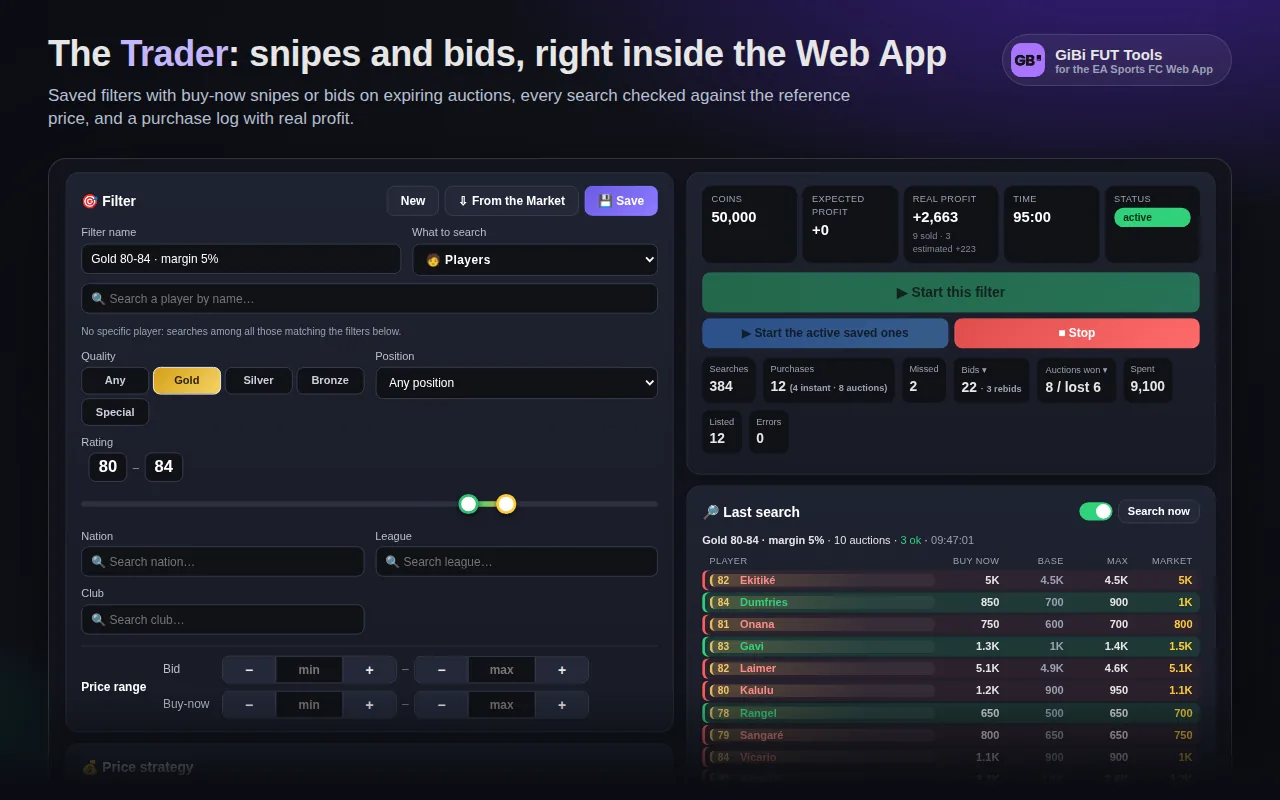
The Trader is the main entry in the side menu: build a filter (a specific player or generic criteria), choose how to buy and what to resell at, and let it run at a pace that looks like a real person.
- Filter: player by name, quality (including Special), position, rating from–to, nation, league, club; the ⇩ From the Market button copies the last search made in the Transfer Market.
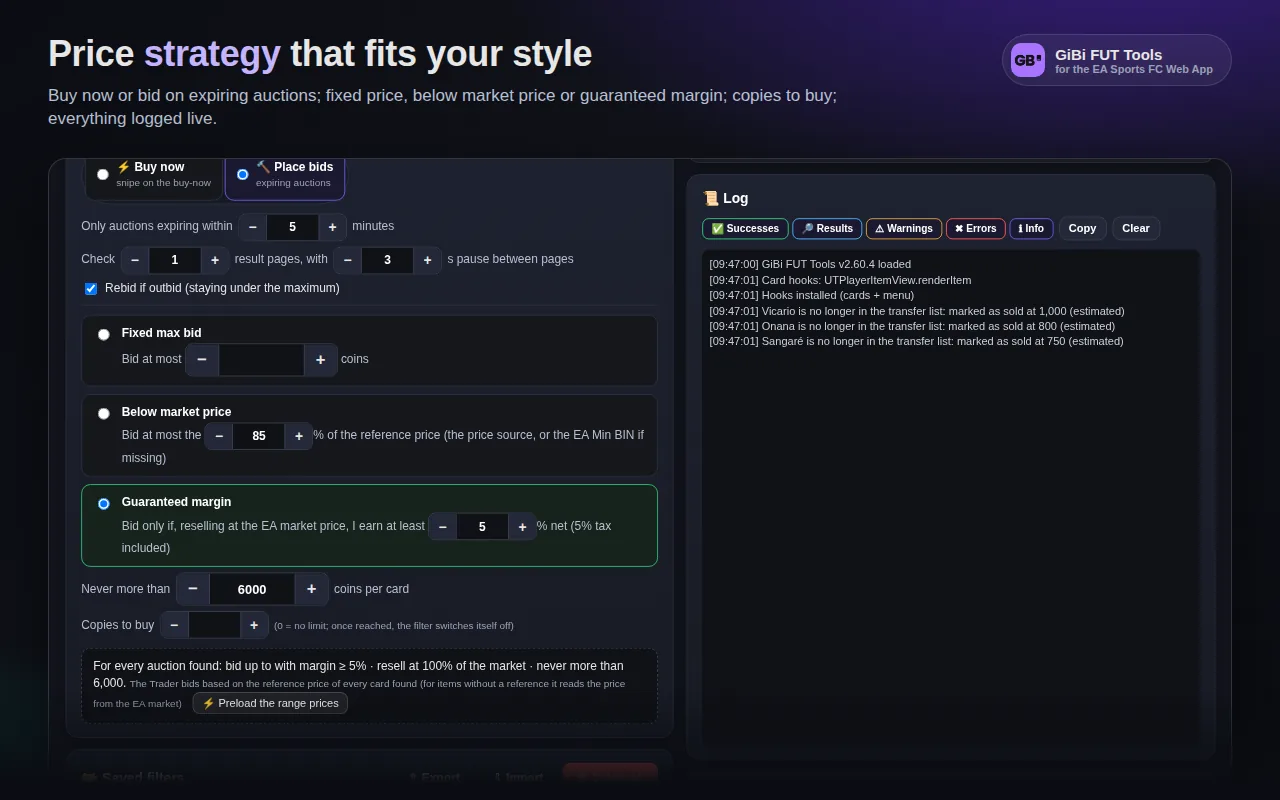
- Three price strategies: fixed price, below market price (buy if ≤ X% of the reference), guaranteed margin (buy only if reselling earns at least X% net, tax included).
- Buy now or bid: snipe the buy-now, or bid on auctions expiring within N minutes with rebids when outbid; won auctions are recognised from the Watched list and listed automatically.
- Automatic resale at a fixed price or a % of the market price, with a safe starting bid (never below break-even) and always inside the EA range.
- Copies to buy per filter, spending cap per card, maximum purchases and spending per session.
- Saved filters with an on/off switch, single start, JSON export and import; automatic rotation between active filters.
- Not only players: chemistry styles, managers, manager league modifiers, badges, kits, stadiums, balls, with Find on the market to pick the exact item.
- Live dashboard: coins, expected and real profit, timer, counters, open bids panel, last search with every player found, filterable log and purchase history.
Speed and protections
Search and pause presets that behave like a person, session limits, safety stops.
No technical numbers to tune: pick a search rhythm and a pause rhythm. Every card shows its risk bars and the estimated searches per hour. Underneath, one queue spaces every request to EA.
- Search rhythm: 🧘 Zen, 🚗 Cruise, 🏃 Sprint, ⚡ Blitz (seconds between searches, reaction before buying, searches before switching filter).
- Pause rhythm: 🛌 Siesta, ☕ Relax, 🫧 Short, 💨 Flash (random “human” pauses, length and frequency).
- Correct anti-cache: every search varies the maximum bid above the purchase price, so no buyable auction is ever excluded.
- EA codes handled: captcha, expired session and locked market stop everything with a notice; temporary blocks (too many requests) pause the Trader for 4–8 minutes and stop it on the third in a row.
- Active tab: a muted audio track keeps Chrome from throttling the tab in the background while the Trader runs.
- Session limits: maximum purchases and spending, errors before a pause, price validity.
Sell, Bulk sell and profit per row
List at the right price in one click, one card or all of them.
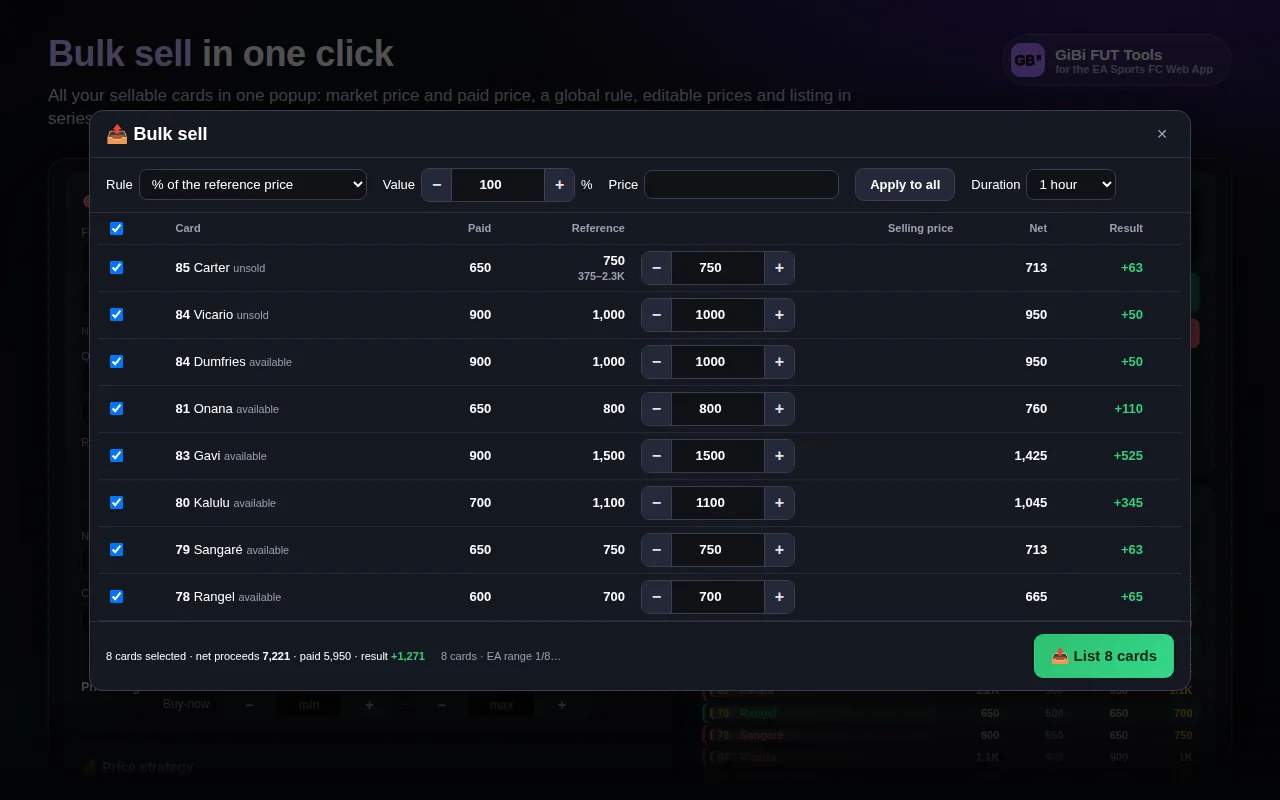
The Sell box appears in the panel of every card you own; Bulk sell sits at the top of the transfer list and in the Trader. In the lists, next to every card, you see what you paid and what you earn.
- Sell box: market price with its age, what you paid, price adjustable with −/+ and −10% … +10% presets, net income after the tax, difference from what you paid, immediate listing (from the club too).
- Bulk sell: every sellable card in one popup (available, unsold, won auctions), a global rule (% of market, margin on what you paid net of tax, fixed price), editable price per row, Check EA prices and one button to list everything in sequence.
- Profit boxes on the row of every card you own: Paid, Sold / Listed / market, Profit or Potential in green or red.
- Selling formula for thin and deep markets: buy at the absolute minimum, sell at the level the market absorbs (liquid floor, pressure, falling market).
- Safe starting bid: never below break-even, one step under the buy-now, inside the EA range.
Market analysis (Scout)
Measures the price cards really sell at and proposes flips ready for the Trader.
From budget, quality and risk profile: the Scout reads the market twice a few minutes apart, counts real sales and computes for every card the snipe threshold, the maximum bid and the expected hourly gain.
- Real sales: auctions seen in the first reading and gone before their expiry in the second are sales; that gives sales per hour.
- Sells at: the lowest buy-now right now, never above the reference + 5%; the snipe threshold always sits below it.
- Threshold with proof: a proposal holds only if auctions really appeared under that figure; otherwise “threshold not found”.
- Bid lane: expiring auctions with a low current bid → bid proposals up to that level.
- Clear verdicts: on sale under the flip price, bids possible, to follow; ✎ opens the filter in the Trader already filled in.
- Save all flips / Start all flips: one snipe filter for every valid flip, launched together.
- The Previous scan column remembers the last scan and shows the hour range in which the card is cheapest.
Forecast from the price history
Rebounds, daily cycles and rises from the hourly price history of every card.
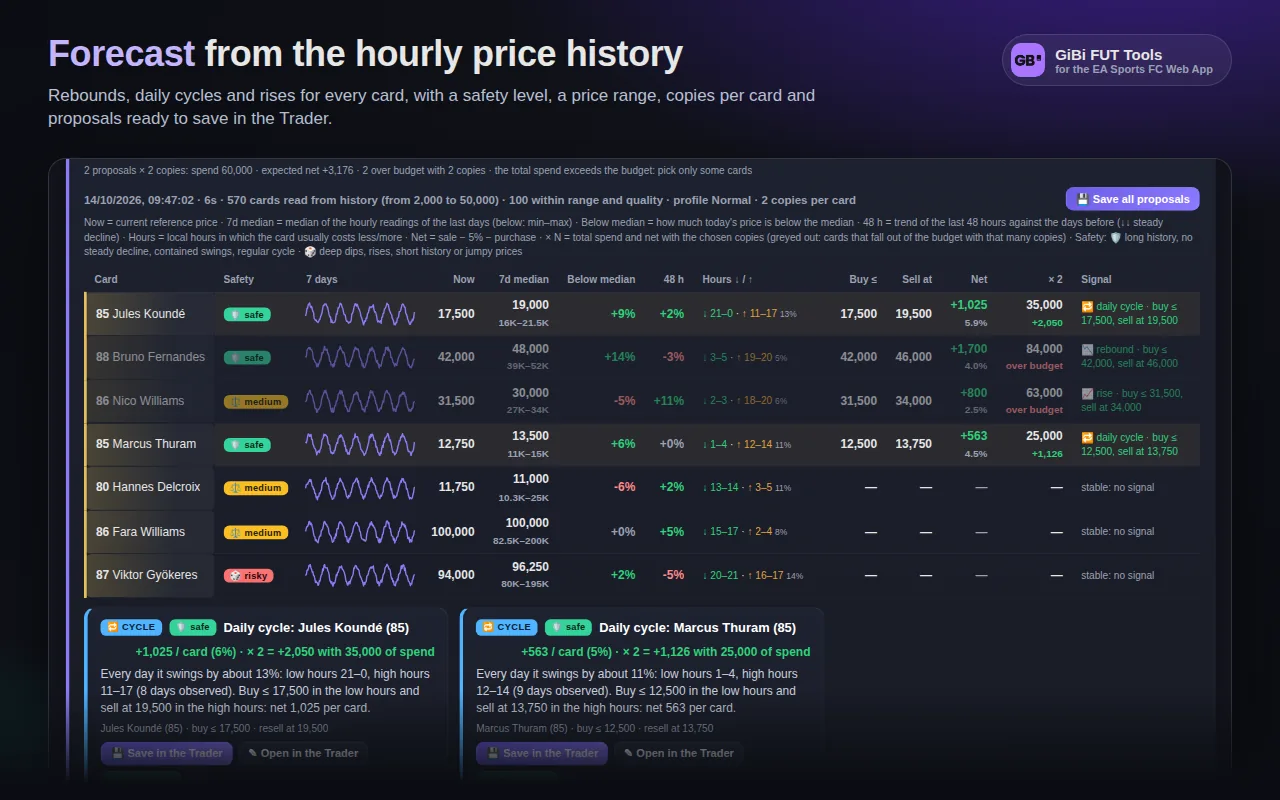
The shared database records the reference price of every card every hour, even when nobody has the Web App open. The Forecast searches that history for three signals and turns them into ready-made filters.
- 📉 Rebound: a card under its 7-day median for a momentary dip, with a partial return expected.
- 🔁 Daily cycle: recurring low hours to buy and high hours to sell, in local time.
- 📈 Rise: the median of the last 48 hours above the days before and the price still high.
- Safety 0–100 for every signal (🛡️ safe, ⚖️ medium, 🎲 risky) from the length and regularity of the history.
- Price range and copies per card: the table shows total spend and net, proposals carry the number of copies into the filter.
- 7-day chart, current price, median with min–max, 48 h trend, buy ≤ and sell at for every card; no search on the EA market, it takes seconds.
Album and FUT Gallery
The FUT Gallery rebuilt inside the Web App: collection, plans for every grade, best lineup.
The FC 27 Gallery only exists on console and PC. The Album rebuilds it: it reads your collection, knows the 125 sets with grades, thresholds and rewards, and computes in an instant what to buy for every grade.
- Scan the club and Sync collection: collected and holographic cards, including the ones sold or discarded after being pasted in.
- Plan all in 💰 Economy mode (the cheapest lineup for every grade) or ✨ Experience mode (the most points within the budget).
- Tag bonuses computed as in the game: Same nation, Same player, First owner, TOTW, Holographic, Silver, Bronze and all the others.
- Your best lineup with your own cards only, bonuses included: the cards to put in the game, drawn as real FC cards.
- ⚡ Snipe grade: one filter per card of the plan, one copy per player, immediate resale in Fast, Break-even or Profit mode; when a card is taken its filter turns off, when all are taken the Trader stops.
- Grid by league with sticky headers, tokens earned, sets at the top grade, SBC cards recognised (they count only while their challenge is still open).
SBCs and token challenges
Solves squads with your cards, buys the concept players from the Trader, submits token challenges.
On an SBC screen the Complete the SBC button appears: it reads the requirements from the Web App, finds the cheapest lineup among your cards (and, if needed, among the ones to buy) and fills the squad by itself.
- Full requirements: team rating, chemistry with the formation’s positions, min/max players per league, nation, club, quality and rating, different nations/leagues/clubs, Icons, first owner, rarity groups.
- Valuable untradeables protected: above 1,500 coins every coin weighs triple, so an 89 never ends up in an easy challenge.
- Options: duplicates only, untradeables only, leave the active squad alone, complete with concept players; blacklist of cards never to use.
- Buy the concept players in the Trader: one filter per card, a management panel inside the challenge, automatic replacement in the squad as soon as a card is bought.
- Complete every squad of a set, one after the other, each card used in at most one squad.
- 🎟️ Token challenges: a Study of the cheapest combination (your cards + cards to buy, copies per card), Find Solution, Submit in batches with confirmation, automatic submission from the Trader.
Bronze Pack Method
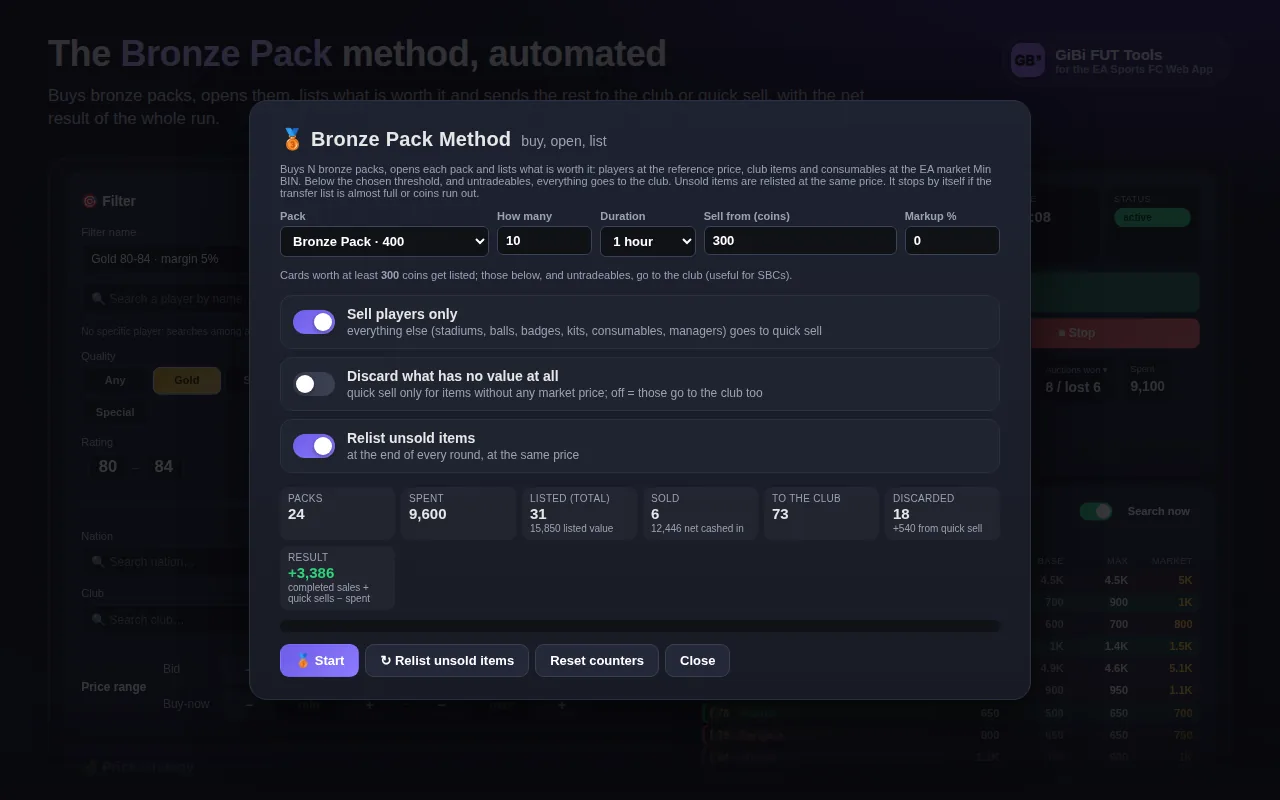
Buys bronze packs, opens them, lists what is worth it and sends the rest to the club.
In the store a purple pill opens the method window: choose the pack, how many to buy, the auction length and the threshold to sell from. The extension does the rest, pack after pack.
- Every item priced from the reference, the archive or the Min BIN measured on the EA market.
- Worth at least the threshold → listed (starting bid at 90%); worth less → club, for the SBCs; option to discard what has no value at all.
- Sell players only: everything else goes straight to quick sell without a price lookup.
- Gifts inside a pack are reported and left where they are; an error on one item never stops the run.
- Stops by itself with fewer than 8 free slots in the transfer list or not enough coins; unsold items relisted with one button.
- Every item listed enters the log with paid = its share of the pack, so real profit lands in the recap.
Pack value and transfer list recap
What a pack is worth before you open it, and how your market is going today.
In a pack preview and among the unassigned items the Pack value card appears. At the top of the transfer list, the Your market today card sums up spent, earned and net for the day.
- Pack value: total, sellable and untradeable items, market value with the net, quick sell, “best realisable”, Check prices, Sell the sellable, Discard untradeables.
- Your market today: Spent → Earned = Net, bought, sold with real profit, listed, to collect, unsold, Trader total.
- Inline badges next to the EA headings: if you sell everything, earned, unsold.
- The day’s sales stay in the count even after Clear sold.
Automations and purchase log
Cleanup of lost auctions and sold items, relisting, a log with expected and real profit.
Three automations, off by default, run every 2 minutes while the Web App is open. The purchase log follows every card bought, by the Trader or by hand, until it sells.
- Clear lost auctions: removes from the Watched list the auctions closed without a win.
- Clear sold: frees the transfer list after the log has counted the sale.
- Relist unsold: every expired auction goes back on sale at the same price.
- Purchase log: paid, list price, expected profit, sale price and real profit once the card is sold; manual purchases in the Web App included.
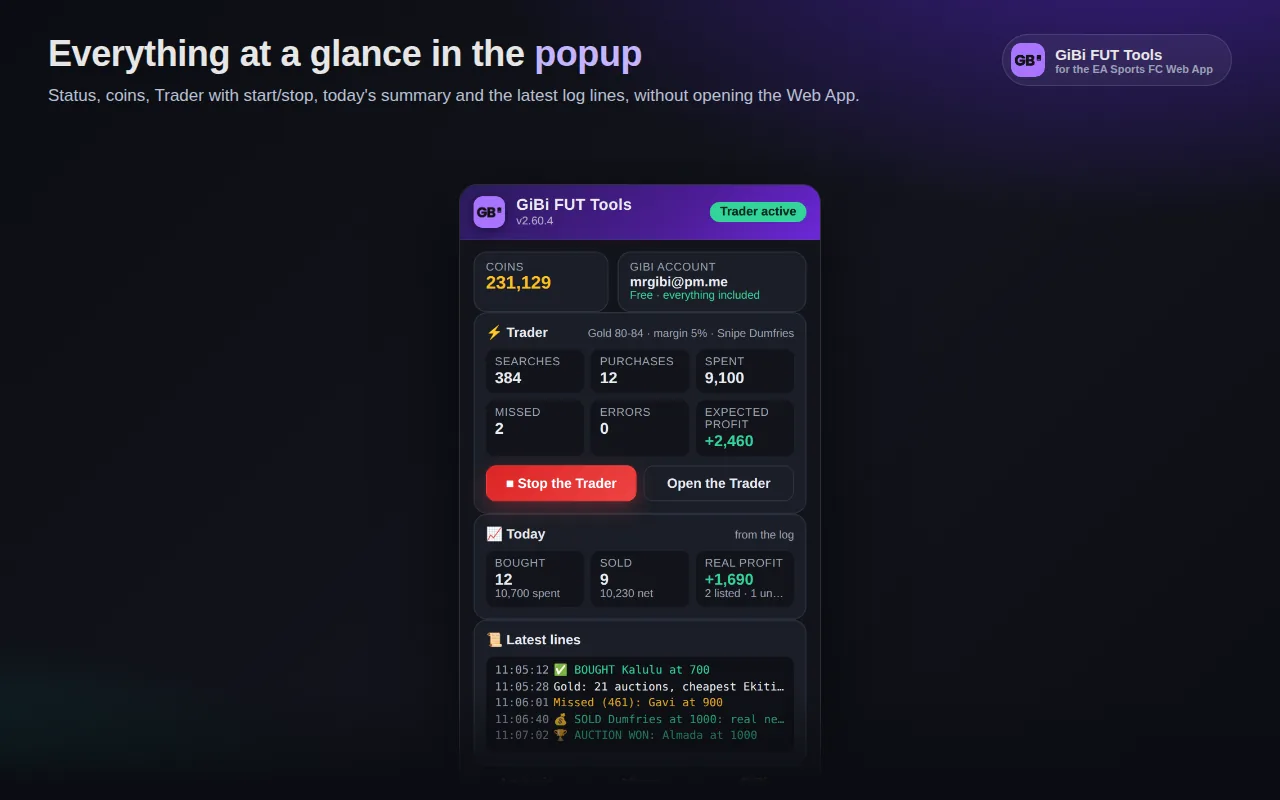
- Daily recap and the extension popup with coins, Trader, today and the last lines.
- Distinct sounds for a purchase, a sale, a completed challenge, a pause requested by EA, a captcha.
Shortcuts and club filters
Search by hand without a mouse and find the sellable cards in your club at once.
In the Transfer Market every action has a key, with a yellow label next to the button it presses. In the club a filter bar hides starters, loans and untradeables.
- Left hand: Space Search, W/S Buy now ±, D/A Min bid ±, E Buy now, Q Bid, R/F previous/next card, Z/X page, Enter confirm, Esc cancel.
- Keys configurable from a popup, with Last key telling you live what it did.
- Filters in Club → Players: All / Tradeable / Untradeable, Hide starters, Hide loans, Duplicates only, remembered between visits.
Account, shared archive and privacy
A free GiBi account with its activation code, a shared price archive, no ads and no tracking.
The GiBi account is created on gibifut.com; the extension only asks for the profile’s activation code, bound to one EA account. Every user contributes to the shared price archive and receives everyone else’s prices.
- Free account on gibifut.com, active at once; in the extension you enter the profile’s activation code, no email or password.
- One code, one EA account: linked through an anonymous fingerprint of the EA persona, movable once every 30 days from the profile.
- Shared price archive: the Min BINs you measure reach everyone anonymously; the server rejects absurd prices and keeps 7 days of history per card.
- Data in the browser with its own panel (every area with its Clear) and Reset everything: as freshly installed.
- Italian or English, taken from the Web App language and changeable in GiBi → Settings.
- No remote code, one permission (storage), two hosts (the EA Web App and the GiBiFUT Supabase project).