

The Trader is the extension’s main page. A filter says what to search, what to buy at and what to do next. This guide builds a simple filter on a specific player, then a generic one by rating band.
The Trader page
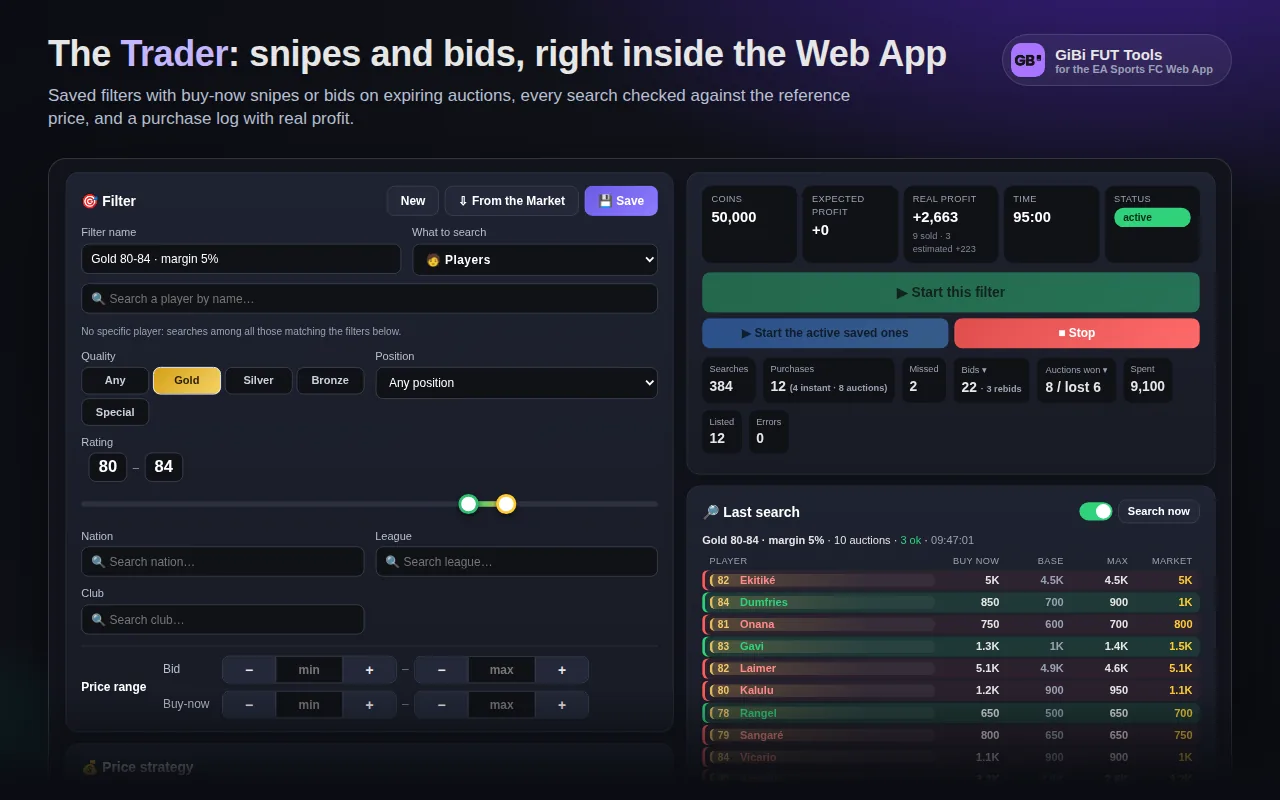
In the side menu press Trader. On the left are the filter cards (Filter, Price strategy, Saved filters, Speed, Limits and selling); on the right the dashboard with coins, expected profit, timer, counters, the last search and the log.
Step 1 · What to search
- 1In the Filter card type the player’s name in the search field and pick the card from the list (portrait and reference price with its age appear).
- 2Or leave the player empty and filter by quality (Gold / Silver / Bronze / Special), position, rating from–to, nation, league and club.
- 3Just made a search in the Web App’s Transfer Market? Press ⇩ From the Market: the filter copies every criterion, including type and category of non-player items.
- 4The EA search price range (min/max bid, min/max buy-now) is optional: EA returns only auctions inside the range, handy to skip cards out of reach.
Step 2 · Price strategy
At the top of the card choose ⚡ Buy now (snipe the buy-now) or 🔨 Bid. Then the strategy:
- Fixed price: buy if the buy-now is ≤ X coins.
- Below market price: buy if ≤ X% of the reference price (default 85%). The reference refreshes every few minutes, so the filter follows the market.
- Guaranteed margin: buy only if, reselling at the market price, you earn at least X% net after the 5% tax.
Step 3 · After the purchase
- Keep it: the card stays in the club (for SBCs or the Album).
- Resell at a fixed price or at a % of the market price: the Trader lists it at once with a safe starting bid, never below break-even and inside the EA range.
- Never more than: a spending cap per card. Required in generic percentage filters; with a specific player you can leave it empty and the maximum follows the market.
- Copies to buy: once reached, the filter turns itself off (0 = no limit).
Step 4 · Save and start
- 1Press 💾 Save in the Saved filters card: the filter appears in the list with a switch.
- 2Start this filter runs only the one you are editing; Start the active saved ones runs every filter with the switch on, rotating between them.
- 3In the dashboard watch Last search: every player found with buy-now, bid, expiry, allowed maximum and market price, green if buyable and red if too expensive.
- 4Stop (in the Trader or in the bottom bar) stops everything.
A generic filter: gold 80–84 with margin
- 1Player empty, quality Gold, rating 80–84.
- 2Strategy Guaranteed margin at 5%, resale at a % of the market price (100%), Never more than cap 5,000.
- 3In generic filters the Trader buys or bids only with a price verified less than 10 minutes ago: cards met without a price are checked one per search and evaluated from the next round. The first rounds “learn” the market.
Reading the log
The log on the right has filters by type (successes, results, warnings, errors, info). Every round explains why it bought or skipped: “below the EA minimum”, “no margin”, “price not verified”. In the dashboard Expected profit counts the cards still listed, Real profit the ones really sold.